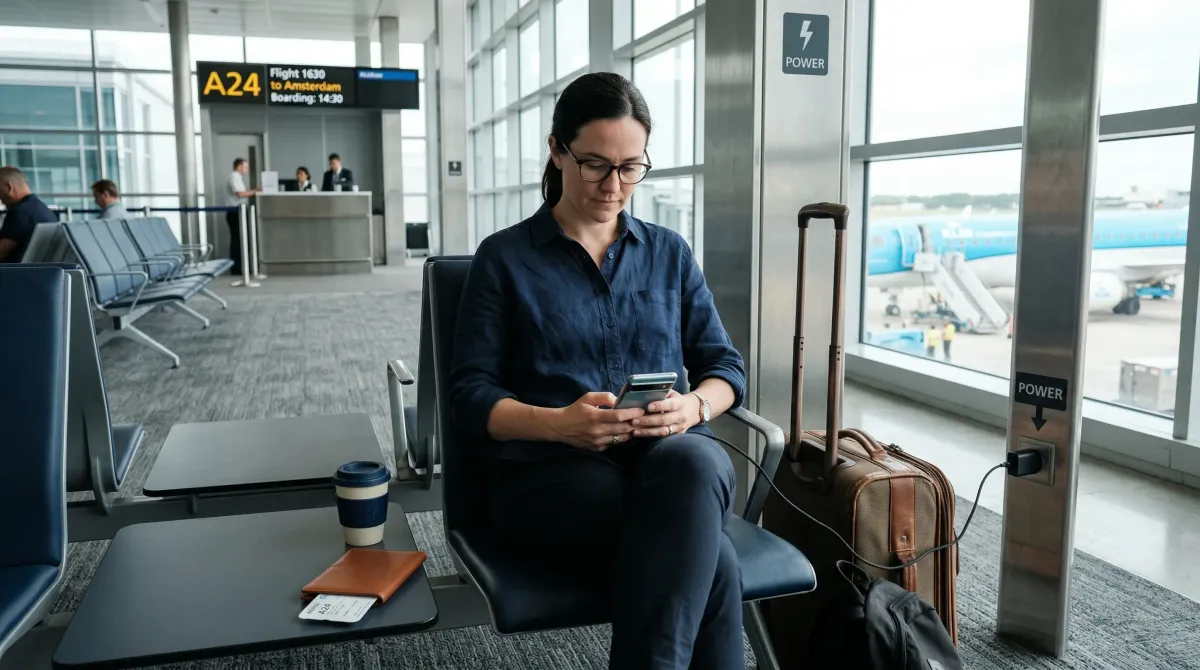
Low battery makes people do dumb things on a trip.
You are trying to pull up a boarding pass, message your host, open a train ticket, or check a map in a place you do not know well. Your phone is at 4 percent. Suddenly that random USB port on the airport seat, the hotel lobby kiosk, or the shared computer in a business center starts looking like a good idea.
That is the moment this article is for.
CISA advises travelers to avoid connecting a mobile device to any computer or charging station they do not control. TSA and FAA guidance adds the other half of the picture: power banks count as spare lithium batteries, they belong in carry-on baggage, and your device may need enough charge to power on during screening.
So this is not a scare piece about mysterious hacker gadgets in every terminal. It is a calmer and more useful checklist: how to stay charged without backing yourself into risky USB habits or sloppy battery planning.
What this checklist is trying to prevent
The goal is not to build a perfect cyber-defense system at Gate B14.
The goal is to avoid three very ordinary travel problems:
- plugging your phone into hardware you do not control just because you are desperate
- losing access to maps, tickets, hotel details, or two-factor login because your battery went flat
- packing chargers and batteries in ways that create screening trouble or last-minute stress
If we solve those three things, the rest gets easier.
Public Charging Safety Tips While Traveling: 9 Ways to Keep Your Phone Alive Without Risky USB Ports
1. Treat public USB ports and shared computers as untrusted
This is the core habit.
CISA’s travel guidance says to avoid connecting your mobile device to any computer or charging station that you do not control, including airport charging stations and shared library computers. The reason is simple: a USB connection is not always just power. It can also create a path for data interaction you did not mean to allow.
You do not need to panic every time you see a charging port in public. Just stop thinking of a public USB port as the same thing as a wall outlet.
A useful rule is:
- wall outlet plus your own charger is the normal option
- your own power bank is the backup option
- a public USB port is the option you try hard not to need
That one mental shift solves a lot.
2. Prefer a wall outlet with your own charger brick and cable
If you need power in an airport, station, lobby, or cafe, the safer default is a standard outlet and the charger you brought yourself.
That approach keeps the data connection part out of the equation. It also means you are not relying on whatever cable, kiosk, or seat-back port happens to be available.
This sounds almost too obvious to count as advice, but it matters because travelers often pack beautifully for the flight and badly for the terminal. They check the long cable. They bury the charging brick. They assume there will be a clean, easy place to plug in later.
There might not be.
Bring the charger setup you actually want to use in public, not the one that only works when you have a hotel nightstand and ten quiet minutes.
3. Carry a power bank, but pack it the right way
This is where device safety and airport rules overlap.
TSA says spare lithium batteries, including power banks and charging cases, must be carried in carry-on baggage only. FAA guidance says the same thing more bluntly: spare lithium batteries and portable rechargers are prohibited in checked baggage and must stay with the passenger in the cabin.
That means your power bank is not just a convenience item. It is your best way to avoid random public USB ports, and it also has to be packed correctly.
Keep in mind:
- power banks belong in your carry-on, not checked luggage
- if your carry-on gets gate-checked, the power bank needs to come out
- battery terminals should be protected from short circuit
If you already know you rely on your phone for boarding passes, hotel entry, ride-share, and maps, a charged power bank is not overplanning. It is basic trip insurance.
4. Keep one working charging kit in your personal item, not buried in your bag
The nicest charger in the world is useless if it lives under three layers of clothes in the overhead bin.
Make one small charging kit easy to reach:
- one charging brick
- one cable that you know works
- one power bank
That kit should live in the bag under your seat, your day bag, or the compartment you can reach without unpacking your life in public.
This is one of those tiny travel habits that pays off fast. When your battery dips, you can respond in thirty seconds instead of kneeling on the floor next to your suitcase, untangling cords and making yourself more likely to grab whatever public port is nearest.
5. Start topping up early instead of waiting for battery panic
Most bad charging decisions happen at 5 percent.
At that point people stop comparing options. They just plug in somewhere. Then they sit on the floor next to a random seat post or accept the first sketchy cable they find because they feel cornered.
The better move is boring and effective: top up earlier.
If you know you have a long transfer, a delayed train, or an unfamiliar arrival ahead, charge while you still have margin. Add power when you are back at your room. Top up in an airport lounge, cafe, or gate area while you still have 40 percent instead of when the phone is about to die.
Good charging safety is often just good timing.
6. Do not let charging become an excuse to stay on risky networks
This one pairs naturally with our Hotel Wi-Fi Safety Tips: 10 Ways to Protect Your Devices While Traveling.
CISA’s travel guidance warns against using open public Wi-Fi for sensitive activity, and its travel tip sheet says travelers should confirm the real network name and login steps with staff before connecting. It also recommends disabling auto-connect behavior so your device is not constantly joining nearby networks on its own.
Why mention that in an article about charging?
Because the habits overlap in real life. People plug into a public charging point, sit still for twenty minutes, and then start doing everything at once: email, banking, cloud logins, flight changes, hotel messages, password resets.
If you need to charge in public:
- avoid sensitive logins on random Wi-Fi
- use your own hotspot or cellular data for anything important when possible
- turn off auto-join habits that make your phone connect first and ask questions later
The safest charging stop is the one where you get power without creating a second problem.
7. Stay with your phone and keep it locked while it charges
Charging in public is also a physical-security problem, not only a digital one.
NICCS/CISA travel guidance tells travelers not to leave equipment unattended in public places and to keep devices secured in airports, airplanes, taxis, and hotel rooms. That advice is easy to forget when a charging outlet is half-hidden behind a seat or column and you are tempted to walk away for coffee.
Do not do that.
If you need the outlet, stay near the phone. If you need to move, unplug and take the device with you. And while it is charging, keep the phone locked so a quick grab or curious glance does not become a second headache.
This matters even more when the phone is your wallet, room key, translator, map, and backup ID system all at once.
8. Keep enough battery to power on at security and during disruptions
TSA says officers may ask travelers to power up electronic devices, including phones, and powerless devices are not permitted onboard. That alone is a good reason not to run your battery into the ground on a travel day.
It is not only about security screening, either.
A dead phone at the wrong moment can also mean:
- no boarding pass when the app logs you out
- no train ticket QR code at the platform
- no address for your accommodation
- no access to bank alerts or multi-factor codes
If you have already read our Travel Document Backup Checklist: 10 Things to Save Before You Leave Home, you know why redundancy matters. Battery life is part of that same system. Try not to board a long flight, enter a long line, or land late at night with your phone hanging on by a single percent.
9. Pack cables and batteries like tools, not loose clutter
FAA guidance notes that spare batteries should be protected from damage and short circuit. In plain travel language, that means your charging gear should not be bouncing around loose with coins, keys, and whatever else ended up at the bottom of your bag.
Keep things simple:
- use one small pouch for charging gear
- protect exposed battery terminals when needed
- retire damaged cables instead of hoping they survive one more trip
- do a quick check before departure so you are not discovering a dead power bank at the gate
Messy charging gear creates messy decisions. The cleaner your kit is, the less likely you are to borrow random accessories or depend on public hardware you would rather avoid.
A simple travel charging setup that works
For most trips, you do not need a giant tech pouch.
This is enough:
- one wall charger you trust
- one cable you have tested recently
- one fully charged power bank in your carry-on
- one small pouch or pocket that keeps those items easy to reach
That setup is much better than carrying five questionable cables and still ending up with 2 percent at the gate.
Final thoughts
The smartest public charging strategy is not clever. It is prepared.
Bring your own power. Use outlets and gear you control. Do not wait until low battery turns everything into a rushed compromise. And treat your phone like the essential travel tool it has become, because for most people it now holds tickets, check-in details, bank access, maps, contacts, and recovery paths all at once.
If you are building out a more resilient travel setup, this article fits naturally with our Travel Wallet Safety Tips: 10 Smarter Ways to Carry Cash, Cards, and Passport, Hotel Room Safety Checklist: 11 Things to Check in the First 5 Minutes, and Vacation Rental Safety Checklist: 12 Things to Check Before You Pay and Before You Unpack.
Research and references
- Holiday Traveling with Personal Internet-Enabled Devices, CISA
- Cybersecurity When Traveling Tip Sheet (PDF), CISA
- Cybersecurity While Traveling (PDF), NICCS / CISA
- Lithium batteries with 100 watt hours or less in a device, TSA
- What Can I Bring? Complete List, TSA
- Lithium Batteries in Baggage, FAA
- PackSafe - Lithium Batteries, FAA

Discussion
Comments
Share a helpful tip, question, or takeaway from Public Charging Safety Tips While Traveling: 9 Ways to Keep Your Phone Alive Without Risky USB Ports.
0 Comments
Loading comments…